Open-source authoring app
TeXworks is a free and open-source productivity software for authoring TeX (LaTEX, ConTeXt, and XeTeX) documents. Inspired by Dick Koch’s award-winning TeXShop for Mac, this app makes allows opening, editing, and exporting TeX documents. More than this type of file, it also has PDF viewing capabilities. This editor provides an integrated and easy-to-use environment for users and features a clean, simple interface accessible even to non-technical users.
Top Recommended Alternative

Easy-to-use editor
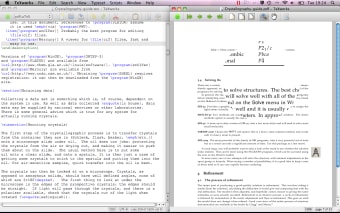
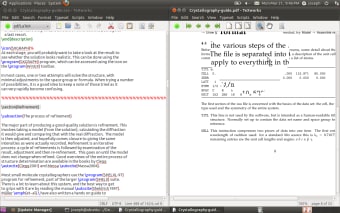
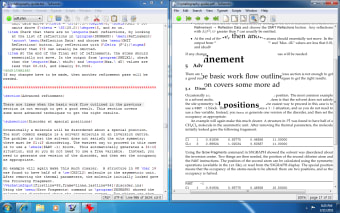
TeXworks provides a simple interface for working with TeX documents. The app has a comprehensive and user-friendly design making it a breeze to load, edit, and save the files to your device. All the tools and features that you need for your workflow are available in plain view and accessible. More so, the editing field is large and clean-looking for easier writing and stylizing of content. The editor is Unicode, providing you with quick access settings for the encoding style. It also offers the possibility to jump to a specific line of text.
However, despite its simple, well-designed graphical user interface, it has a large catalog of helpful and practical tools. For one, it has a search function, which allows you to find specific content in your text. With this, you can easily replace texts. More so, it also helps you to copy texts and even highlight specific sections. The app also gives you the option to change the font style, add and remove comments, and toggle line numbers.
Furthermore, you can display syntax coloring, and you can get to choose the type of Auto-Indent mode and Smart Quotes. Being a TeX-based editor, the app also provides you with various typesets. As noted, TeXworks also works as a PDF viewer. However, it does not allow you to edit documents as it only functions as a PDF reader. More, when viewing PDF files, the interface changes slightly to accommodate new buttons.
Simple and reliable
TeXworks is, by all means, a helpful tool that you can use to edit TeX files. The app provides a wide array of tools that simplifies the process of opening, editing, and exporting TeX documents. Alternatively, it can also be used as a PDF viewer with the option to extract information. All in all, it is a simple yet reliable authoring application.